


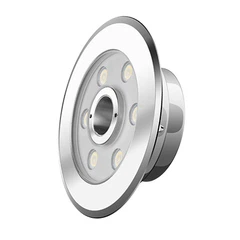


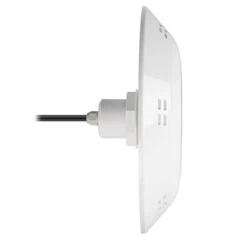


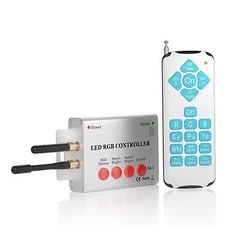
Hey there, pool owners! If you're looking to add some serious style and functionality to your pool, installing RGB LED pool lights in a pool with a swim jet is a game-changer. As a supplier of top-notch RGB LED pool lights, I've seen firsthand the amazing transformation these lights can bring to a pool. In this blog post, I'll walk you through the process of installing RGB LED pool lights in a pool with a swim jet, step by step.
Why RGB LED Pool Lights?
Before we dive into the installation process, let's talk about why RGB LED pool lights are so awesome. First of all, they offer a wide range of colors and lighting effects, allowing you to create a customized atmosphere for your pool. Whether you want a relaxing blue glow for a late-night swim or a vibrant party atmosphere with flashing lights, RGB LED pool lights can do it all.
Secondly, LED lights are energy-efficient and long-lasting. They use less electricity than traditional pool lights, which can save you money on your energy bills in the long run. Plus, they have a longer lifespan, so you won't have to replace them as often.
Finally, RGB LED pool lights are easy to control. You can use a remote control or a smartphone app to change the colors and lighting effects with just a few taps. This makes it easy to adjust the lighting to suit your mood or the occasion.
Tools and Materials You'll Need
Before you start the installation process, you'll need to gather the following tools and materials:
- RGB LED pool lights
- Swim jet
- Power supply
- Electrical wires
- Wire connectors
- Screwdriver
- Drill
- PVC pipe cutter
- Silicone sealant
- Goggles and gloves
Step 1: Choose the Right Location
The first step in installing RGB LED pool lights in a pool with a swim jet is to choose the right location. You'll want to place the lights in a spot where they will provide the best illumination and create the desired effect. Some factors to consider when choosing the location include:
- The size and shape of your pool
- The location of the swim jet
- The depth of the pool
- The type of lighting effect you want to create
Once you've chosen the location, mark it with a piece of tape or a marker.
Step 2: Install the Swim Jet
If you haven't already installed the swim jet, now is the time to do it. Follow the manufacturer's instructions carefully to ensure that the swim jet is installed correctly. Make sure that the swim jet is securely attached to the pool wall and that the water flow is directed in the right direction.
Step 3: Install the Power Supply
The next step is to install the power supply. The power supply should be located outside the pool area and should be protected from the elements. You'll need to run electrical wires from the power supply to the pool lights and the swim jet. Make sure that the wires are properly insulated and that they are rated for outdoor use.
Step 4: Connect the Electrical Wires
Once the power supply is installed, you'll need to connect the electrical wires to the pool lights and the swim jet. Use wire connectors to join the wires together and make sure that the connections are secure. You may need to use a screwdriver to tighten the wire connectors.
Step 5: Install the RGB LED Pool Lights
Now it's time to install the RGB LED pool lights. Start by drilling holes in the pool wall at the marked locations. Make sure that the holes are the right size for the pool lights. Then, insert the pool lights into the holes and secure them with screws or clips.
Step 6: Connect the Pool Lights to the Power Supply
Once the pool lights are installed, you'll need to connect them to the power supply. Use electrical wires to connect the pool lights to the power supply and make sure that the connections are secure. You may need to use a wire connector to join the wires together.


Step 7: Test the Lights and the Swim Jet
Before you fill the pool with water, it's important to test the lights and the swim jet to make sure that they are working properly. Turn on the power supply and use the remote control or the smartphone app to test the different colors and lighting effects of the pool lights. Make sure that the swim jet is also working properly and that the water flow is strong.
Step 8: Seal the Holes
Once you've tested the lights and the swim jet, it's time to seal the holes in the pool wall. Use silicone sealant to fill the holes around the pool lights and the swim jet. Make sure that the sealant is applied evenly and that it is allowed to dry completely before filling the pool with water.
Step 9: Fill the Pool with Water
Finally, it's time to fill the pool with water. Make sure that the water level is high enough to cover the pool lights and the swim jet. Once the pool is filled with water, turn on the power supply and enjoy your new RGB LED pool lights and swim jet!
Tips and Tricks
- Make sure that you follow all the safety instructions when installing the pool lights and the swim jet. If you're not comfortable working with electricity, it's best to hire a professional electrician to do the job.
- When choosing the RGB LED pool lights, make sure that they are compatible with your pool and the swim jet. You may need to consult with the manufacturer or a pool professional to ensure that you choose the right lights.
- If you want to create a more dramatic effect, you can install multiple RGB LED pool lights in different locations around the pool. This will allow you to create a more immersive lighting experience.
- You can also use the RGB LED pool lights to create different lighting scenes for different occasions. For example, you can set the lights to a relaxing blue glow for a romantic evening or a vibrant party atmosphere with flashing lights for a pool party.
Conclusion
Installing RGB LED pool lights in a pool with a swim jet is a great way to add some style and functionality to your pool. By following the steps outlined in this blog post, you can install the lights and the swim jet yourself and enjoy a beautiful, illuminated pool all year round.
If you're interested in purchasing RGB LED pool lights or have any questions about the installation process, please don't hesitate to [contact us for a purchase negotiation]. We're here to help you create the perfect pool experience.
References
- "Pool Lighting Installation Guide." Pool and Spa News.
- "How to Install a Swim Jet." In The Swim.
- "RGB LED Pool Lights: A Buyer's Guide." LED Lighting Info.
Remember to check out these links for more information: 12v swimming pool with led lights, 12v rgb led swimming pool light, ac12v rgb led pool light.